South African Revenue Service Payment Rules
1 SUMMARY
a) This document details the payment rules that must be adhered to when paying the South African
Revenue Service (SARS), to ensure timeous and accurate payment allocation.
b) When making a payment, all SARS clients must adhere to the payment rules stipulated in this document.
c) Payments that do not adhere to the payment rules may be rejected.
2 GENERAL INFORMATION
a) This document outlines the different payment options. Kindly consult your bank regarding the specific
banking solutions offered to meet the requirements outlined in this document.
b) SARS will only recognise a payment once received into the SARS bank account.
i) Any payment received into the SARS bank account after the due date will be regarded as a late
payment.
ii) Taxpayers must ensure that payment is made before the cut-off time of the relative bank
product used to ensure that funds will reflect in time on the SARS bank account.
iii) It remains the full responsibility of the client to ensure SARS receives payment on time to avoid
any penalties and/or interest from being charged.
c) Customs and Excise clients who are required to declare goods electronically in terms of Rule
101A.01A(2)(a)(v) of the Customs and Excise Act, No. 91 of 1964 must, whether or not registered for
deferment of payment of duty, use the SARS eFiling service when making a payment to SARS.
i) Clients to whom such rules do not apply may utilise the alternative payment channel of internet
banking (EFT)
ii) Cash deposits for Customs and Excise clients at bank branches and ATMs are no longer
available as a payment option.
d) A number of payment options are available to clients depending on whether a payment is made within
or outside the Republic.
3 PAYMENT OPTIONS AVAILABLE TO SARS CLIENTS
3.1 PAYMENT OPTION 1 – PAYMENT THROUGH eFILING
a) An eFiling payment is initiated on SARS eFiling.
i) The payment request is automatically sent by eFiling presented by SARS to the bank once the
client have released the payment on eFiling.
ii) The payer will need to log onto their banking product solution where the transaction from eFiling
will be listed.
iii) The payer will have to authorise the payment on the bank product for the funds to transfer to
SARS. On authorisation, the bank will send an immediate confirmation to SARS that payment
has been made.
iv) Note that the payment is not affected until it is authorised by the payer on the bank product.
v) Only once the payer has logged onto their banking product (e.g., internet banking profile) and
authorised the payment request, will the transaction be processed in accordance with the
banking rules.
vi) Consult your bank regarding the cut-off times for eFiling payments to be affected to SARS
timeously.
vii) eFiling transactions are irrevocable once approved.
b) The following banks are supported for eFiling payments:
i) ABSA
ii) Al Baraka Bank
iii) Bidvest Bank
iv) Capitec
v) Citibank
vi) FNB
vii) HBZ Bank LTD
viii) HSBC
ix) Investec
x) Nedbank
xi) SASFIN Bank
xii) Standard Bank
xiii) Standard Chartered Bank
Note: Certain banks cannot process payments more than R5 million. To pay amounts due for more than R5
million, clients of these banks must pay multiple eFiling payments, each not exceeding R5 million.
c) eFiling allows payment of the following revenue types:
i) Paying from return:
A) EMP201: PAYE/SDL/UIF
B) VAT201: VAT
C) IT34: Assessed Tax
D) IRP6: Provisional Tax
E) IT56: STC (Secondary Tax on Companies)
F) TDCON: Transfer Duty
G) STT declaration: STT (Security Transfer Tax)
H) WTI return: Withholding Tax on Interest
I) DTR01 / DTR02: Dividend Withholding Tax
J) APT201: Air Passenger Tax
K) eAccount: Customs Duty, Customs VAT; Customs Provisional Payment; Miscellaneous;
CEB01 Customs Provisional Payment
L) EXD 075 Ad varolem – AVE
M) EXD 159 Petroleum – SOS
N) EXD 160 Petroleum – VM
O) EXD 161 Plastic Bags – ELG
P) EXD 162 Bio Diesel – BDO
Q) EXD 163 Diamond Export – DEL
R) EXD 176 Electricity – ELC
S) EXD 177 Carbon Emissions for Motor Industry – CO2
T) EXD 178 Tyre – TLE
U) EXD 179 Sugar – SBL
V) EXD180 Carbon Tax
W) EXD 261 Tobacco – TBC
X) EXD 262 Malt Beer – MLT
Y) EXD 263 Spirits – SPR
Z) EXD 264 Other Fermented Beverages OFB
AA) EXD 265 Vermouth – VER
BB) EXD 266 Wine – WINE
CC) EXD 267 Traditional African Beer – TAB
DD) Statement of account: Admin Penalties, Value Added Tax, Assessed Tax and Air Passenger
Tax
ii) Additional Payments
A) Air Passenger Tax (APT) (only if no return was submitted on eFiling)
B) Estate Duty (ESD)
C) Donation Tax (DON)
D) Withholding Tax on Royalties (WTR)
E) VAT Non-Registered Vendors (VNR)
F) Income Tax (IT)
G) Assessed Tax
H) Admin Penalties
I) Mineral Royalties (MPR3)
J) International Oil Pollution Compensation Fund (IOPCF) Levy
K) Pay as you earn (Only if no return was submitted on eFiling) (PAYE)
L) Provisional Tax (Only if no return was submitted on eFiling) (PROV)
M) Retirement Fund Tax (RFT)
N) Small Business Amnesty (SBA)
O) Value Added Tax (Only if no return was submitted on eFiling) (VAT)
P) Note: Turnover Tax is paid as part of Provisional Tax
3.2 PAYMENT OPTION 2 – EFT PAYMENTS
a) The SARS bank account numbers have been replaced with unique beneficiary account IDs.
b) Payments can be made via EFT into the relevant SARS public beneficiary listed on the banking
platforms.
c) The SARS beneficiary IDs are listed as public beneficiaries on the banking platforms of the following
banks:
i) ABSA
ii) African Bank
iii) Al Baraka Bank
iv) Access Bank (South Africa) Limited (previously Grobank)
v) Bank Zero
vi) Capitec Bank
vii) Discovery Bank
viii) FNB
ix) Grindrod Bank
x) HSBC
xi) Investec
xii) JP Morgan
xiii) Nedbank
xiv) Standard Bank
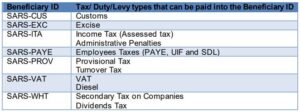
d) The following table lists all SARS beneficiary account IDs and tax types to which each applies:
e) The payment will only be accepted if the correct 19-digit payment reference number (PRN) is used.
The unique PRN can be obtained on the relevant SARS payment form – refer to section 4.
3.3 PAYMENT OPTION 3 – PAYMENTS PAYMENT AT A SARS CUSTOMS BRANCH OFFICE
a) Debit and / or Credit card payment facilities are available at all major ports of entry for payment by
travellers for VAT/ duties levied on accompanied traveller’s baggage.
b) Travelers are allowed to make cash payments at SARS Customs branch offices. Cash payments from
traders are not accepted at SARS Customs branch offices or at bank branches or ATMs.
c) The following restrictions apply regarding payments made at a Customs branch office:
i) Cash rules and limitations:
A) The number of coins that will be received at Customs branch offices are limited according
to denominations:
I) A maximum amount of R50 in R5 coins;
II) A maximum amount of R20 in R2 coins;
III) A maximum amount of R20 in R1 coins;
IV) A maximum amount of R5 in 10 cents – 50 cents coins;
V) A maximum amount of 50c in 5 cents coins; and
VI) The amount of bank notes is limited to R2 000.00 per transaction.
Note: All cash payments are rounded off to the nearest 5 cents.
3.4 FOREIGN PAYMENTS
a) Please note: This payment method should only be used by foreign taxpayers where no other payment
options or channels are available e.g., where payments using eFiling, internet banking (EFT) or
payment at a bank is not available. Note that if a foreign taxpayer has a South African bank account,
the SWIFT payment method may not be used.
b) Payments can be made electronically into the SARS banking account specified below using the
standard SWIFT payment method.
i) All foreign payments should be made in RAND.
ii) Any charges to make a foreign payment is not allowed to be deducted from the amount owing to
SARS.
c) SARS-FOR-999 must be used as the bank account number when completing a SWIFT 103 message
(foreign payment request).
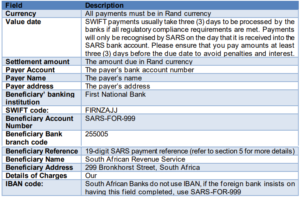
d) The following information should be completed into the SWIFT/ foreign payment request:
e) Any queries regarding the completion of the SWIFT 103 message should be directed to First National
Bank call centre 08601 FOREX (08601 36739) or (+27) 11 352 5902 if phoning from abroad.
f) As in the case of all electronic payments, it is imperative that the correct payment reference
information is provided to ensure that payments can be easily identified and correctly allocated upon
receipt by SARS. Refer to section 3.3.
4 DETERMINING AND USING 19 DIGIT PAYMENT REFERENCE NUMBER (PRN)
a) A unique PRN is pre-populated on every request for payment issued by SARS (e.g., statement of
account, return) and is used to match the payment to the item (s) appearing on the specific form.
Clients are requested to use the PRN appearing on these forms when making payment.
b) The PRN number for respective tax types appears on the relevant forms.
c) When making payment it is imperative that the correct payment reference number “PRN” is quoted to
ensure that payments are easily identified and correctly allocated to item(s) in the account.
d) For those tax types where the PRN is not pre-populated on a tax return/declaration, the 19-digit
payment reference number can be manually determined by clients with reference to the tax account.
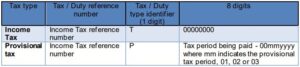
e) In most instances, separate payments are required if the payment was for different tax types and tax
periods to ensure that payments are correctly allocated. This is only applicable where the payment is
made at a bank and not on eFiling.
f) Separate payments are required if the payment is for different tax types, where the payment is made
at a bank and not on eFiling.
g) In instances where the PRN is influenced by the period, separate payments are required if the
payment relates to different tax periods to ensure that payments are correctly allocated.
h) Unreferenced/partial payments received from clients may be allocated to the oldest debt first, on a
First-In-First-Out (FIFO) basis.
i) Unique Payment Reference Number (PRN) to traders:
i) Non-deferment declarations: SARS will provide the trader with a unique PRN for each
immediately payable declaration (cash declaration) in the EDI CUSRES message.
ii) Statement of Account (CSA): SARS will provide the trader, who has a deferment or individual
financial account, with a unique PRN for all payable transactions included in the CSA. The PRN
appears at the bottom of the CSA under the section “Payment Advice”.
iii) Specific requested declarations: On request, SARS can provide the trader with a single PRN
which is linked to various declarations on the same account.
5 DEFINITIONS, ACRONYMS AND ABBREVIATIONS
a) Refer to the Link for centralised definitions, acronyms, and abbreviations.